Stop managing host pools one at a time
authored by Dave Fiske
If you're running Azure Virtual Desktop (AVD) at enterprise scale, you already know the problem. Host pools scattered across regions. Users statically assigned to one of them individually or via group. If that region has a capacity issue, or you want to roll out a new image, or your org just grew and needs rebalancing, you're doing it by hand... for the fifth time this quarter. I've been there.
At 10 host pools, it's annoying. At 50, it's a full-time job. At 150+, it's impossible to keep up without a team dedicated to it.
One large enterprise came to Nerdio running about 200 host pools across two Azure tenants, two regions, and three availability zones. Each pool configured separately. No cross-region failover automation. No unified assignment layer. Just duplicated configuration repeated 200 times.
That's the problem Nerdio Global Pools was built to solve.
Why native AVD breaks down at scale
Microsoft treats every host pool as an independent object with a static user-to-host-pool binding. At enterprise scale, that creates recurring problems.
Operational silos: 20–50+ host pools, each administered as its own unit. Admin overhead scales directly with pool count. No unified view, no shared policy layer.
Static identity binding: Moving a user between pools means manually reassigning entitlements and disrupting their session. Every move is a manual operation.
No native failover: If a pool, region, or back end goes down, AVD has no mechanism to automatically reroute affected users. Outages stay outages until you fix them by hand.
None of these are edge cases. They're the day-to-day reality of running AVD at scale.
What Global Pools is
Global Pools is a new capability in Nerdio Manager for Enterprise. The short version: a logical aggregation and policy-based assignment layer above AVD host pools to manage many pools as one.
You create a Global Pool, add your existing host pools as members, and manage users at the Global Pool level. One Entra group spans host pools, VNets, regions, subscriptions, and tenants. Nerdio handles where each user lands based on rules you define.
Users see the same Published Desktop or RemoteApp workspace they've always seen. The static model of "User A always lands on Host Pool West" goes away.
And critically: Global Pools sits on top of native AVD architecture. No changes to your underlying host pools. Zero architectural impact.
The architecture: how it's structured
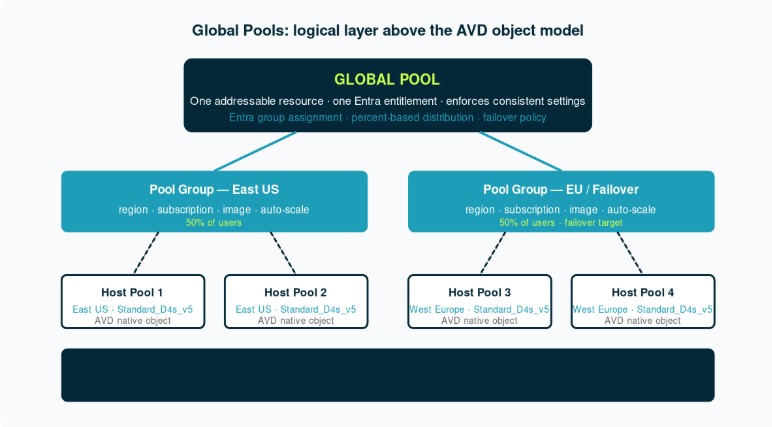
The hierarchy has three levels.
Global Pool: One addressable resource. One Entra entitlement. Enforces consistent settings across everything below it.
Pool Groups: A Pool Group is a collection of host pools that share a region, subscription, image, and auto-scale configuration. You might have a Pool Group for East US and a separate one for West Europe that doubles as a failover target.
Individual host pools: These are standard AVD objects. Nothing changes about how they work. Nerdio takes over the assignment logic that sits above them.
When a user connects, Nerdio evaluates the Global Pool's assignment policy, checks which Pool Group they belong to, and routes them to the right host pool. No manual intervention. That routing logic runs on policy. Here's how it's defined:
Policy-based user assignment
This is where the operational shift happens. Global Pools doesn't just move users between pools statically. It does it through policies you define once and let run.
User context assignment: Route users by Entra group with priority ordering.
Global Pool Profiles: consistent configuration at scale
One of the harder problems in multi-pool environments is configuration drift. You update auto-scale settings on Pool A and forget Pool C. You deploy a new image to three of your five East pools and miss the rest during a rushed rollout. Over time, the pools diverge.
Global Pool Profiles address this directly. A Profile is a configuration template that pushes out to every member pool automatically.
Profiles are layered. You set the consistent baseline at the Profile level, then override specific settings at the individual pool level where you genuinely need variation. Region is the obvious one. VM SKU is another, especially in markets where specific sizes aren't available.
If you're already using host pool profiles in Nerdio Manager, the mental model transfers directly. Same idea, just one level higher.
What the current Private Preview includes (Nerdio Manager for Enterprise 8.1)
Global Pools shipped in Private Preview with Nerdio Manager for Enterprise 8.1. The current release includes:
What this gets you right now: unified user assignment across multi-region or multi-availability-zone host pool sets. Instead of managing 200 pools independently, you organize them into Global Pools and manage user distribution through policy.
Why this matters on a scale
Managing 100+ AVD host pools individually means every decision multiplies with the number of pools. Each image rollout, each policy change, and each user move is a per-pool operation. You either over-invest in headcount or accept configuration drift.
With Global Pools, you make those decisions once at the policy level. Distribution rules, configuration consistency, failover behavior: All of it becomes policy you define, not manual operations you perform on each pool.
For enterprises running 50, 100, or 200+ host pools across multiple regions and availability zones, that's a different way of operating AVD.
Current status and access
Public Preview is live in July 2026 with Nerdio Manager for Enterprise 8.1.
If you're an existing Nerdio Manager customer running large-scale AVD and want to evaluate it in Private Preview, reach out to your Nerdio account team. More technical documentation and configuration guidance is published alongside the Public Preview.